
Party Deck, a drinking card game for 18+
A drinking card game on your phone for adults. Draw a card and read it out: drink, give sips, everyone, a new rule, a challenge or a water break. Water counts as a drink.
Players
2 or more
Ages
Adults (18+)
Time
As long as you like
Free in your browser. No app, no sign-up.
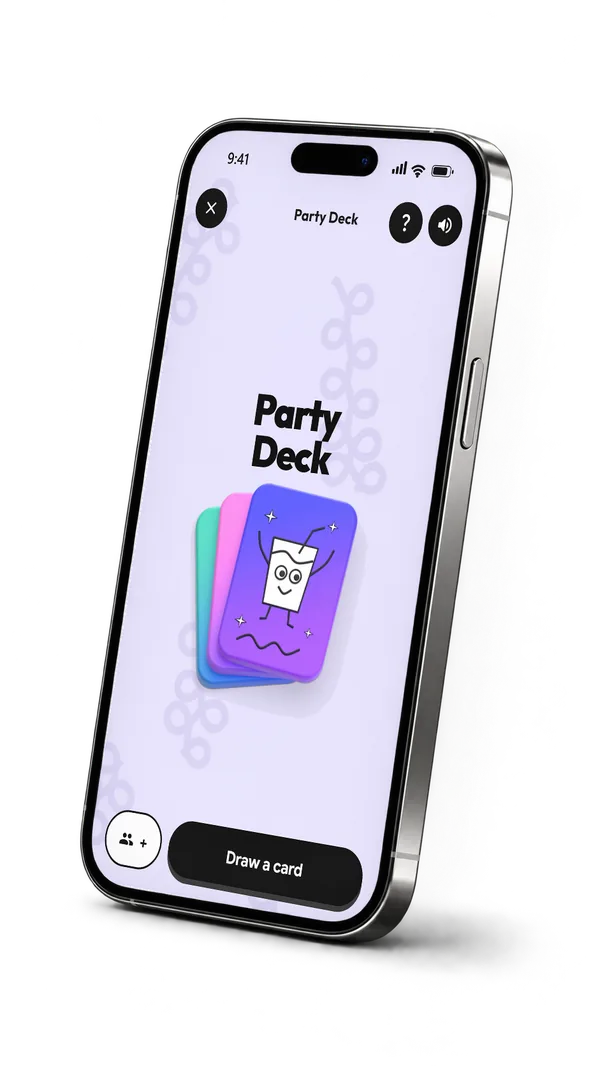
How to play
Confirm you are 18 or older. Add names if you like, to take turns in order.
Draw a card and read it out: drink, give sips, everyone, a new rule, a challenge or a water break.
A new rule stays at the top until the next rule card.
A sip is a sip of whatever you are drinking, and water counts. Play responsibly.
Good for
- A bachelorette or birthday weekend
- Drinks before a night out
- Grown ups’ night once the kids are in bed
More party games
Spin the Bottle
Flick the bottle and see who it picks.
Truth or Dare
Pick Truth or Dare. Family, Friends and Adults decks.
Never Have I Ever
Tap if you have. Last one with hearts wins.
Most Likely To
Read the question, count to three, everyone points.
Would You Rather
Pick one of two. Vote in secret, then reveal.
Act It Out
Act the word without talking. Beat the clock.
Forehead Guess
Phone on your forehead, the group gives clues.
Odd One Out
One of you has a different word. Find them.


Give your guests these games
Every StayPerk guest manual has the games built in. Guests open them from the link or QR code in your rental, with nothing to download and no pieces to lose. You choose which games to show.
Questions about Party Deck
Is there a drinking card game I can play on my phone?
Yes. Party Deck runs in your phone browser with 90 cards in six kinds, from drink and give cards to new rules and water breaks. Players confirm they are 18 or older before it opens.
How many sips does a card ask for?
At most three. No card asks anyone to finish a drink, and about one card in nine is a water break.
Can we play with soft drinks?
Yes. A sip is a sip of whatever you are drinking, and water counts.
Still have a question?
Write to us and a person will reply, or look it up in the Help Center.