A cleaner checklist with photo proof
Send your cleaner one link. They tick your checklist and take photos on their phone, with no app or login. Each photo is stamped with the property and the time, and you get a report for every clean.
Set up cleaner linksFree. No subscription. No credit card.
From the link to the report
Send the cleaner link
Tap Send to cleaner on Turnovers or the calendar. Text it, send it on WhatsApp or by email, or show a QR code. The link lists every coming turnover, with same-day changeovers flagged.
Set your checklist once
It starts from the rooms in your guest manual. Choose which tasks need a photo.
The cleaner walks through
They open the camera inside the page and take photos as they go. A problem, like a stain or a breakage, reaches you by email straight away.
You get the report
When the clean is marked done, you get an email with every task and photo. Print it or save it as a PDF for a guest, Airbnb or an insurer.
Proof that holds up
A time on a phone photo is easy to doubt. StayPerk records when each photo reached its server and keeps the original.
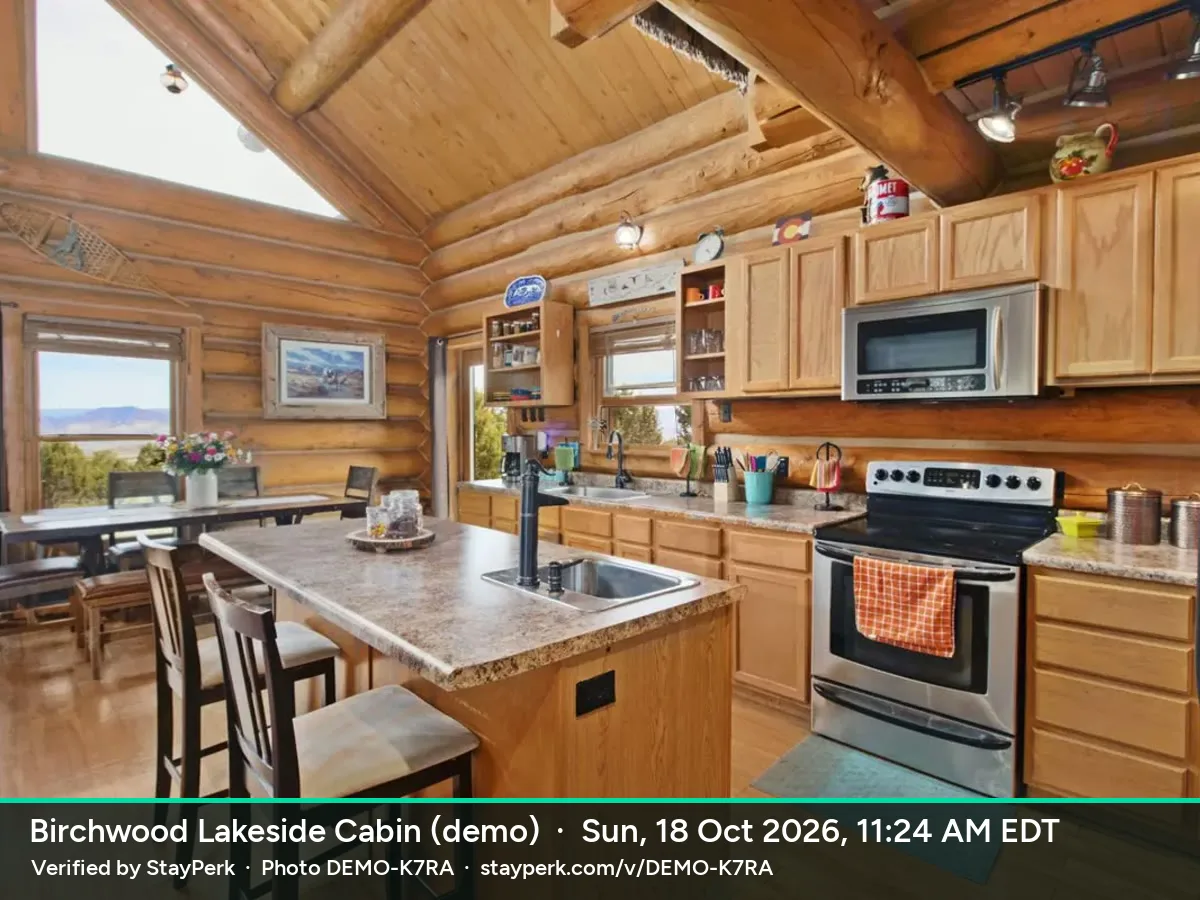
- A stamp on every photo
- The property, the date and time in the property's time zone, Verified by StayPerk and a photo code.
- A code anyone can check
- Give the code to a guest, Airbnb or an insurer. It opens StayPerk's copy and its record, without guest names or booking details.
- Fingerprinted originals
- StayPerk keeps the original and its fingerprint, so an edited copy no longer matches the record.
- No app for the cleaner
- The checklist runs in the phone's browser and works with the cleaner you already have.
- Clean it yourself
- Tap Take photos now and walk round before guests arrive. Your photos are stamped the same way.
- Records that stay as they are
- Once a clean is marked done, its photos can't be deleted. A second clean the same day gets its own checklist.
Compared with a paid cleaning app
Cleaning apps such as Turno offer photo checklists inside their own app. StayPerk's runs in the phone's browser.
| StayPerk | Turno | |
|---|---|---|
| Photo checklists | Yes | Yes |
| App for the cleaner | No app or login: a link | Turno's app |
| Bring your own cleaner | Free for every property | Free for one property, then a monthly fee per property |
| Photo stamped with a code anyone can check | Yes | Not offered |
- Turno's plans checked on its own pages on 25 October 2026. Plans change; follow the links for today's.
- Sources: Turno photo checklists; Turno pricing; Airbnb on damage evidence.
Frequently asked questions
Does my cleaner need an app or an account?
No. They open the link you send in their phone's browser. The camera opens from the page.
Can a photo's time be changed?
The time on the stamp comes from StayPerk's server when the photo arrives, not from the phone. StayPerk keeps the original and its fingerprint, so an edited copy no longer matches the record behind the photo code.
What if a photo comes out wrong?
Until the clean is marked done, the cleaner can delete it and take another. The report notes that a photo was deleted. Once the clean is marked done, photos can't be deleted.
Who can see the photos?
You, from your report. Each photo's code opens StayPerk's copy and its record for anyone you give it to, without guest names or booking details.
Is it free?
Yes. Cleaner links, checklists, photos and reports are free.
Still have a question?
Write to us and a person will reply, or look it up in the Help Center.
No subscription. No credit card.
Give your cleaner a checklist link
Create your account, add a property and send its cleaner link. Your first report arrives after the next clean.