
Itinerary maker, for the whole group
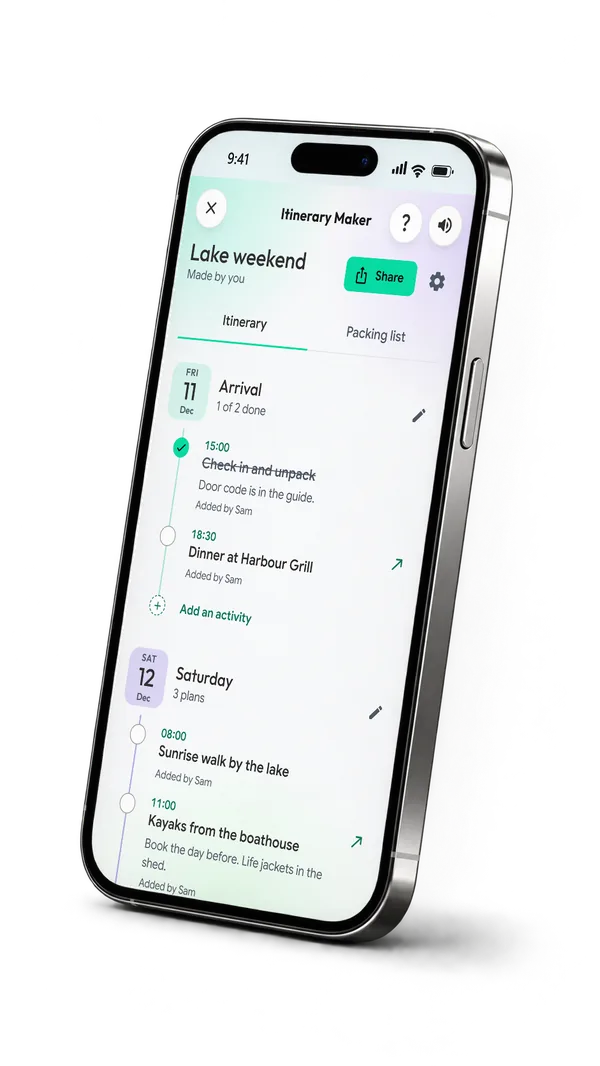
Plan a trip day by day and share it with the people you travel with. The link opens the plan only with its six-digit access code, and everyone sees changes as they happen.
For
Your whole group
Ages
Everyone
Time
As long as you like
Free in your browser. No app, no sign-up.
How it works
Tap Start a plan and add your first day.
Add what you will do, with a time, notes and a link to a map or booking.
Tap Share and send the message to your group. It holds the link and the access code.
Everyone with the code can edit. Or choose that they suggest changes for you to approve.
Good for
- A family week at a rental house
- A bachelorette or birthday weekend
- A road trip with friends
More tools
Sleep Sounds
White noise, rain, the ocean and more, with a sleep timer.
Tonight’s Sky
Sunset, golden hour, the moon and meteor showers.
Packing List
One list for the group: tick it off, say who brings what.
Split the Costs
One shared list of who paid what, and who pays whom.
Gift Draw
Secret Santa on one phone: draw names, no emails.





Give your guests these tools
Every StayPerk guest manual has these tools built in, next to the games. Guests open them from the link or QR code in your rental, and the trip planner shows your ideas for the area. You choose which to show.
Questions about Itinerary Maker
How do I share an itinerary with my group?
Tap Share. The message holds the plan’s link and a six-digit access code. Anyone who has both can open the plan; the link on its own opens nothing.
Can my friends edit the itinerary?
Yes. Everyone with the code can edit by default. In Settings, the person who made the plan can ask for suggestions instead, and accept or decline each one.
Do we need an app or an account?
No. The plan works in the browser on any phone or computer, with no sign-up. Each phone keeps its own way back in.
How long is a plan kept?
Until 60 days after its last change, then it is deleted. The person who made it can delete it sooner.
Still have a question?
Write to us and a person will reply, or look it up in the Help Center.