
Secret Santa generator, on one phone
Gift Draw is a free Secret Santa name draw for family, friends and office gift swaps. Nobody draws their own name, couples can be kept apart, and nobody gives an email address.
For
3 to 12
Ages
Everyone
Time
Two minutes
Free in your browser. No app, no sign-up.
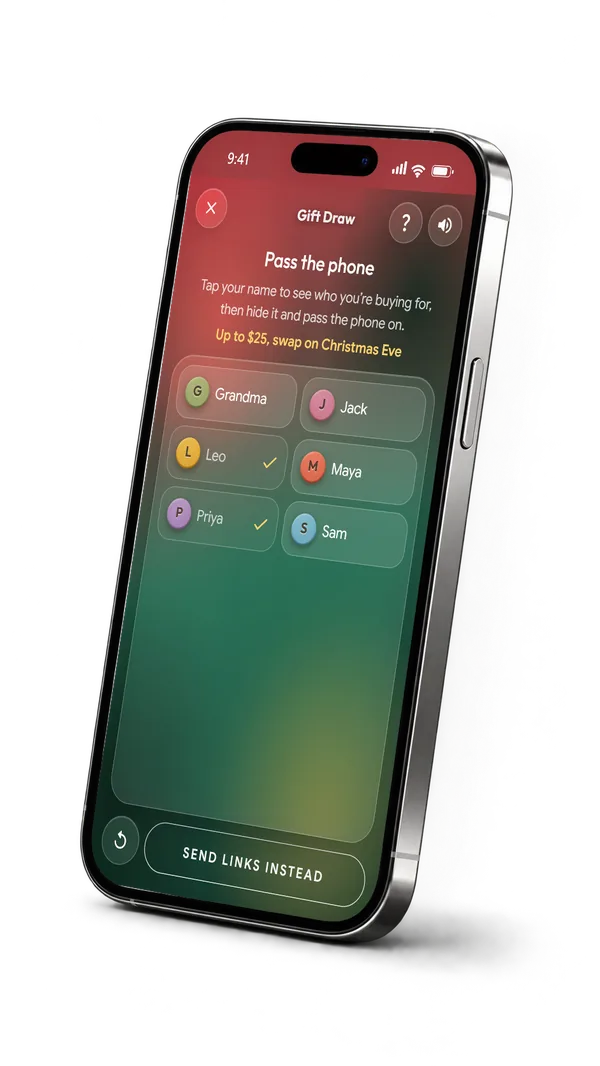
How it works
Add everyone in the draw, or use the names you already added.
Tap Keep two apart to stop a couple drawing each other. Add a budget or swap day if you like.
Tap Draw names.
Pass the phone: each person taps their name, sees who they are buying for, then hides it.
Not in the same room? Tap Send links instead and send each person their own link.
Good for
- A family Christmas at a rental cabin
- A gift swap on a friends’ weekend away
- An office Secret Santa over chat
More tools
Sleep Sounds
White noise, rain, the ocean and more, with a sleep timer.
Tonight’s Sky
Sunset, golden hour, the moon and meteor showers.
Itinerary Maker
Plan each day together. Share it with an access code.
Packing List
One list for the group: tick it off, say who brings what.
Split the Costs
One shared list of who paid what, and who pays whom.




Give your guests these tools
Every StayPerk guest manual has these tools built in, next to the games. Guests open them from the link or QR code in your rental, and the trip planner shows your ideas for the area. You choose which to show.
Questions about Gift Draw
How does a Secret Santa generator work?
It matches everyone to one other person to buy a gift for. Nobody gets their own name, everyone is drawn exactly once, and each person sees only who they drew.
Can I stop couples drawing each other?
Yes. Tap Keep two apart, then tap the two names. The draw never matches them, either way round.
Can people see their name on their own phone?
Yes. Tap Send links instead and send each person their link. It shows only their name. The result is carried inside the link, so no names are sent to StayPerk; send each link only to its person.
What is the difference between Secret Santa and White Elephant?
In Secret Santa everyone draws one person and buys for them in secret. In White Elephant everyone brings one gift, then players take turns picking a wrapped gift or stealing one already opened.
Still have a question?
Write to us and a person will reply, or look it up in the Help Center.