Sleep sounds, with a sleep timer
White noise and calm sounds for a strange bed, a noisy street or a light sleeper. They play in your browser, keep going when you lock your phone, and stop with the timer.
For
Anyone
Ages
Everyone
Time
All night or a timer
Free in your browser. No app, no sign-up.
How it works
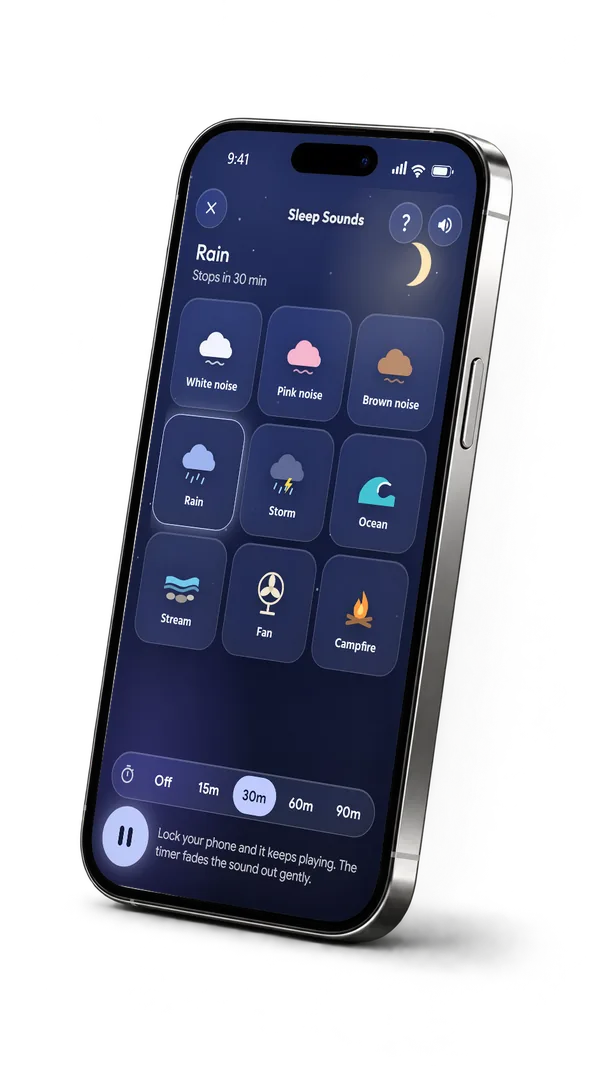
Tap Play, then tap a sound to start it.
Turn the dial to set a timer: 15, 30, 60 or 90 minutes, or all night.
Lock your phone. The sound keeps playing, with play and pause on the lock screen.
Tap the light in the middle to pause, and again to play.
Good for
- Light sleepers in a new place
- Covering street or neighbour noise
- Settling kids at bedtime
- Quiet focus while you work
More tools
Tonight’s Sky
Sunset, golden hour, the moon and meteor showers.
Itinerary Maker
Plan each day together. Share it with an access code.
Packing List
One list for the group: tick it off, say who brings what.
Split the Costs
One shared list of who paid what, and who pays whom.
Gift Draw
Secret Santa on one phone: draw names, no emails.


Give your guests these tools
Every StayPerk guest manual has these tools built in, next to the games. Guests open them from the link or QR code in your rental, and the trip planner shows your ideas for the area. You choose which to show.
Questions about Sleep Sounds
What is the difference between white, pink and brown noise?
White noise has the same energy at every pitch and sounds like a hiss. Pink noise is softer at high pitches, like steady rain. Brown noise is deeper again, like a low rumble or a distant waterfall.
Will it keep playing when my phone is locked?
Yes. Start a sound, then lock your phone. Play and pause appear on the lock screen. Leave the page open in your browser.
How does the sleep timer work?
Choose 15, 30, 60 or 90 minutes and the sound stops at the end. Where the browser allows it, the sound fades out over the last 30 seconds.
Does it use much data?
Very little. Rain, thunder, the ocean, the stream, the fan and the campfire are real recordings of about 1 to 2 MB each, loaded once the first time you play them. White, pink and brown noise are made on your phone.
Still have a question?
Write to us and a person will reply, or look it up in the Help Center.